domingo, 22 de mayo de 2016

Autocad Impresion

Bibliocad

Click Derecho y activar zoom
En laptop
mantener el clic izquierdo y escrolar el pad

Activar una plantilla por defecto
https://www.youtube.com/watch?v=CbWdeXECxhE
**********************
ISO A1 ( 594mm ancho x 841mm alto )  ~ 8 A4 (A1 es por defecto el tamaño de los planos)
A3 ( 297mm ancho x 420 mm alto )  ~ 2 A4

imprimir una ventana
selecciono de plot area
What to do plot:
Window
Selecciono las 2 esquinas a imprimir
Selecciono center the plot (centrar trazado)
Selecciono Fit to paper (escalar hasta ajustar)
**********************
En autocad es posible imprimir desde modelo o presentacion, pero lo optimo es imprimir desde presentación.
Menu de la Aplicacion -> print -> plot(Trazar)
(Ojo hay un boton con flecha en la parte inferior que indica more options)
(En la parte superior hay la opcion configuracion de pagina para cargar una configuracion de pagina ya existente si es que la tenemos)

En la seccion :
What to do plot: (Generalmente trabajaremos por ventanas asi que seleccionamos) 
Window

Drawing orientation
Portrait: vertical(orientacion del texto, osea orientar el texto al lado de menor longitud)
Landscape: Horizontal(orientacion del texto,osea orientar el texto al lado de mayor longitud)

**********************
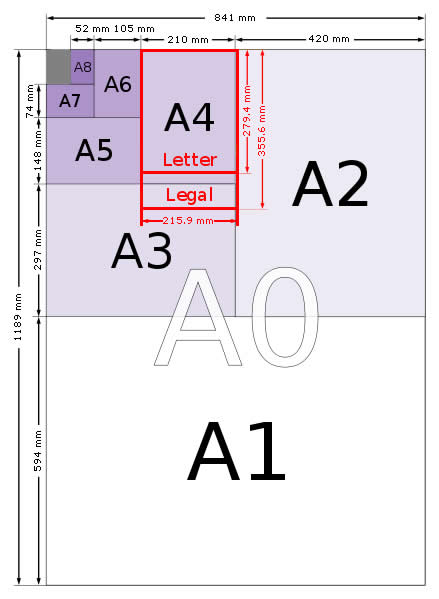

Tamaños de papel de la Serie A Gráfico - A0, A1, A2, A3, A4, A5, A6, A7, A8

Tamaños de papel de la Serie A Gráfico.
Tabla de tamaños de papel desde 4A0 a A10
TamañoAncho x Alto (mm)Ancho x Alto (pulg)
4A01682 x 2378 mm66,2 x 93,6 pulg
2A01189 x 1682 mm46,8 x 66,2 pulg
A0841 x 1189 mm33,1 x 46,8 pulg
A1594 x 841 mm23,4 x 33,1 pulg
A2420 x 594 mm16,5 x 23,4 pulg
A3297 x 420 mm11,7 x 16,5 pulg
A4210 x 297 mm8,3 x 11,7 pulg
A5148 x 210 mm5,8 x 8,3 pulg
A6105 x 148 mm4,1 x 5,8 pulg
A774 x 105 mm2,9 x 4,1 pulg
A852 x 74 mm2,0 x 2,9 pulg
A937 x 52 mm1,5 x 2,0 pulg
A1026 x 37 mm1,0 x 1,5 pulg
fuente:
http://www.tamanosdepapel.com/a-papel-tamanos-tsta.htm?utm_expid=76793102-1072.QcPUjwWzReiR-7FPsA7V_g.1&utm_referrer=https%3A%2F%2Fwww.google.com.pe%2F


sábado, 21 de mayo de 2016

C#

Para determinar si un conjunto es subconjunto de otro
!b.Except(a).Any();
Operaciones en Conjuntos para ver si son iguales
HashSet<int> aSet = new HashSet<int>(a);// donde a es un int []
aSet.SetEquals(b);
aSet.IsProperSubSetOf(bSet);

Otro
a.Intersect(b).Count();
a.Union(b).Distinct().Count()

Ojo  Contains en un arreglo se habilita si esta using System.Linq
b.Contains(x)

mysql cheatsheet

http://www.mysqltutorial.org/mysql-cheat-sheet.aspx
https://dzone.com/refcardz/essential-postgresql
https://dzone.com/refcardz/essential-mysql

column_name data_type[size] [NOT NULL|NULL] [DEFAULT value]
[AUTO_INCREMENT]
If you don’t declare the storage engine explicitly, MySQL will use InnoDB by default.

InnoDB became the default storage engine since MySQL version 5.5. The InnoDB table type brings many benefits of relational database management system such as ACID transaction, referential integrity, and crash recovery. In previous versions, MySQL used MyISAM as the default storage engine.
PRIMARY KEY (col1,col2,...)


PostgreSQL CREATE TABLE

 Summary: in this tutorial, you will learn how to use the PostgreSQL CREATE TABLE statement to create new tables.

PostgreSQL CREATE TABLE syntax

To create a new table in PostgreSQL, you use the CREATE TABLE statement. The following illustrates the syntax of the CREATE TABLE statement:
Let’s examine the syntax of the CREATE TABLE statement  in more detail.
  • First, you specify the name of the new table after the CREATE TABLE clause. The TEMPORARYkeyword is for creating a temporary table, which we will discuss in the temporary table tutorial.
  • Next, you list the column name, its data type, and column constraint. You can have multiple columns in a table, each column is separated by a comma (,). The column constraint defines the rules for the column e.g.,  NOT NULL.
  • Then, after the column list, you define a table-level constraint that defines rules for the data in the table.
  • After that, you specify an existing table from which the new table inherits. It means the new table contains all columns of the existing table and the columns defined in the CREATE TABLEstatement. This is a PostgreSQL’s extension to SQL.

PostgreSQL column constraints

The following are the commonly used column constraints in PostgreSQL:
  • NOT NULL – the value of the column cannot be NULL.
  • UNIQUE – the value of the column must be unique across the whole table. However, the column can have many NULL values because PostgreSQL treats each NULL value to be unique. Notice that SQL standard only allows one NULL value in the column that has the UNIQUE constraint.
  • PRIMARY KEY – this constraint is the combination of NOT NULL and UNIQUE constraints. You can define one column as PRIMARY KEY by using column-level constraint. In case the primary key contains multiple columns, you must use the table-level constraint.
  • CHECK – enables to check a condition when you insert or update data. For example, the values in the price column of the product table must be positive values.
  • REFERENCES – constrains the value of the column that exists in a column in another table. You use REFERENCES to define the foreign key constraint.

ACID

Propiedades ACID

* Atomicidad: cualquier cambio de estado que produce una transacción es atómico. Es decir, ocurren todos o no ocurre ninguno. En otras palabras, esta propiedad asegura que una operación se realiza o no se realiza, por lo tanto no puede quedar el sistema a medias.

* Consistencia: propiedad que asegura que una transacción no romperá con la integridad de una base de datos, pues respeta todas las reglas y directrices de ésta.

* Aislamiento: propiedad que asegura que no se afectarán entre sí las transacciones. En otras palabras, dos o más transacciones sobre los mismos datos no generarán un problema.

* Durabilidad: propiedad que asegura la persistencia de una transacción, es decir, una vez que la transacción quedó aceptada no podrá deshacerse aunque falle el sistema. (yo el sistema operativo)


Integridad: Claves foraneas o transacciones
Alislamiento: transacciones concurrentes
--------

Características de un SGBD:

Atomicidad: la operación se realiza o no
Consistencia: integridad.  Cualquier transacción debe llevar la BD de un estado válido a otro
Aislamiento: define el comportamiento ante transacciones concurrentes
Durabilidad: persistencia de las operaciones

viernes, 20 de mayo de 2016

eventos y delegados

  • Primero se declara el Delegado y después se declara el Evento
  • Se declaran en la clase que va a disparar el evento y en la zona reservada a la declaración de variables (campos) de la clase
  • y luego el/los metodos(s) que dispara el evento;

Ejemplo de Eventos y Delegados

La clase Empleado declara un evento "NombreCambiado" que se lanza cada vez que se cambia el atributo correspondiente al nombre del empleado. El evento tiene un manejador o delegado asociado (tipo del evento) "ActualizacionEventHandler" que declara una signatura para los métodos que pueden ser llamados para tratar el evento. En este caso, los métodos permitidos no devuelven nada (void) y deben tener un argumento de tipo string donde se pasará un mensaje a visualizar. En el método Main(), con la instrucción
MiEmpleado.NombreCambiado +=
new EjemploDelegados.ActualizacionEventHandler(NotificarCambioNombre);
se le indica al delegado que cuando se produzca el evento NombreCambiado se invoque al método "NotificarCambioNombre", método que respeta la firma declarada por el propio manejador de eventos.


*****************************************************************************

Program.cs


using System;

namespace EjemploDelegados
{
class Program
{
  public static void NotificarCambioNombre(string msg)
  {
      //imprimos mensaje aviso.
      Console.WriteLine("¡El nombre del empleado a cambiado!");
      Console.WriteLine(msg);
  }

  public static void Main(string[] args)
  {
      Empleado MiEmpleado = new Empleado("Ramiro");
      MiEmpleado.NombreCambiado +=
new EjemploDelegados.ActualizacionEventHandler(NotificarCambioNombre);
      Console.Write("Nombre empleado: ");
      MiEmpleado.setNombre(Console.ReadLine());

      Console.Write("Pulsa cualquier tecla para continuar . . . ");
      Console.ReadKey(true);
  }

}
}


Empleado.cs


using System;

namespace EjemploDelegados
{
public delegate void ActualizacionEventHandler(string msg); //YO OJO LO DECLARA FUERA DE LA CLASE

public class Empleado
{
//atributo
private string Nombre;

//... resto de atributos..

//declaración del evento
public event ActualizacionEventHandler NombreCambiado;

public Empleado(String Nombre)
{
this.Nombre=Nombre;
}

public void setNombre(string s)
{
//actualizar el atributo
string anteriorNombre=this.Nombre;
this.Nombre = s;

//lanzar el evento
this.NombreCambiado("Era "+anteriorNombre+"
                 y ahora es "+this.Nombre);
}

}
}

miércoles, 18 de mayo de 2016

Por que no poder usar left join sin on

http://stackoverflow.com/questions/16470942/can-i-use-mysql-join-without-on-condition
por lo que dice alli es obligatorio su uso en left y right join

OTRO
https://www.quora.com/SQL-What-is-the-difference-between-inner-join-left-join-right-join-and-full-join

martes, 17 de mayo de 2016

Expresiones regulares JAVA y C#

Por ejemplo, tenemos la siguiente lista de palabras:
gato
gata
gatu
gatos
gatas
  • Si escribimos la siguiente ER "gato", obtendremos como resultado las palabras gato y gatos.
  • Si escribimos la ER "gat[o|a]" obtendremos gato, gata, gatos, gatas.
  • Si escribimos la ER "gato$" obtendremos solamente gato, pues el símbolo '$' representa el final de la cadena, por lo que también podría obtener cualquier palabra que terminara por -gato.
  • El símbolo '^' representa el inicio de la cadena.